EDIT: This post was made before I had to deal with a customers Apple Airport Extreme - It amazes me how Apple doesn't think that port forwarding, SIP ALG, a web GUI, remote access or many of the other features that they leave out of their routers are important!
I have had my share of devices provided by cable and telephone companies to their customers to connect internet services.
There is the Ubee modem that Time Warner Cable installs in businesses that is a modem with a built in router. These are NEVER a good idea to leave alone and should ALWAYS be bridged with a real router installed behind it (ALWAYS make sure it is bridged before installing a router behind it or risk having a double NAT)
Then there is the horrible modem/router that Verizon installs with their FiOS service. Wherever possible (when customer does not have TV service) I remove them and connect a real router directly to the network port of the ONT. You need to release the IP address before replacing the router, otherwise you will need to call Verizon to have them release/renew the DHCP lease once you have the new router installed.
I haven't seen one out in the wild for a while now, but for a short period of time some of the router/modems that Verizon was providing for DSL did not have the option to be bridged. They either stopped providing these routers or finally provided an updated firmware that allows these modems to be bridged.
So with all of those awful devices that the cable and telephone company ISPs provide to their customers, none of those would qualify for the worse. Today I encountered a new router that Optimum has begun providing to their customers. The Sagemcom F@st 3965CV takes the award for the absolute worse device ever provided by a cable or telephone company ISP. Why? Well, when you attempt to browse to the default gateway you are redirected to the Optimum web portal, not to the devices configuration page.
What genius decided that it was a good idea to provide a router that HAS to be managed online, and REQUIRES the customers Optimum credentials (their account user name and password). With this roadblock there is no reason, or no ability to log into the router itself to make any adjustments or changes to the LAN or WAN settings.
EDIT: Apparently Optimum is flashing this "smart router" firmware on all of the routers, regardless of model or manufacturer, that they provide to their customers. This cripples the full capabilities of the router, and prevents local access directly to the router. Do not keep this router connected to your network, install your own router immediately!
 |
| The worst ISP provided router EVER! |
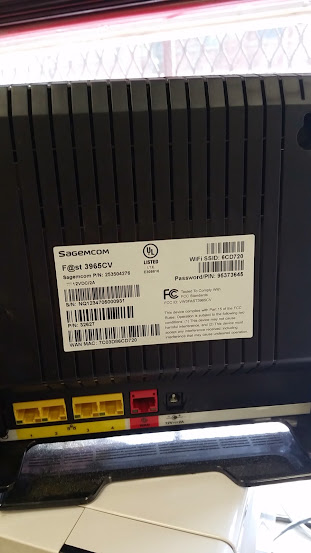 |
| If they charge you for this router, send it back to them and buy your own! |